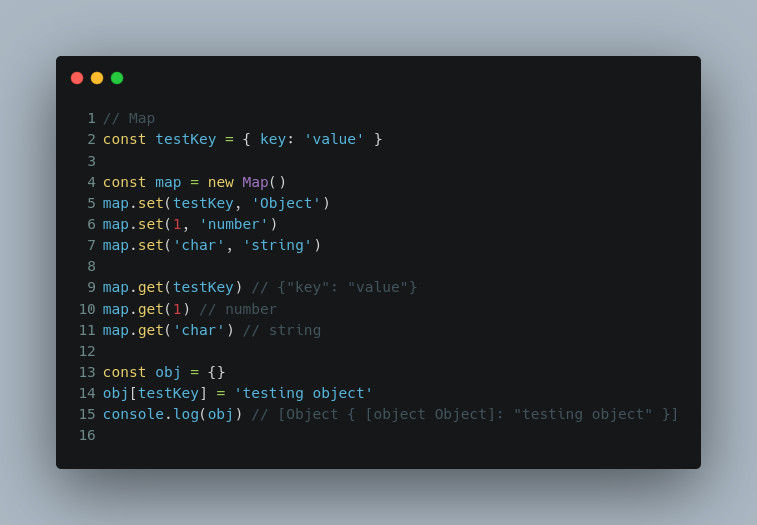
The JavaScript Map is a powerful built-in object designed to hold key-value pairs. Unlike regular objects, Map maintains the insertion order of keys and provides better performance for frequent additions and deletions of key-value pairs.
In this blog, we’ll explore the most commonly used methods of Map and its practical applications.
What is a Map?
A Map is a collection of key-value pairs where keys can be of any data type. This makes it versatile and more flexible compared to objects, which only allow strings and symbols as keys.
Creating a Map
const map = new Map();
Famous Methods of Map
Here’s a list of the most commonly used Map methods and how to use them:
1. set(key, value)
Adds a new key-value pair to the Map.
const map = new Map();
map.set('name', 'John');
map.set('age', 30);
console.log(map); // Map { 'name' => 'John', 'age' => 30 }
2. get(key)
Retrieves the value associated with a given key.
console.log(map.get('name')); // John
3. has(key)
Checks if a specific key exists in the Map.
console.log(map.has('age')); // true
4. delete(key)
Removes a specific key-value pair.
map.delete('age');
console.log(map); // Map { 'name' => 'John' }
5. clear()
Removes all key-value pairs from the Map.
map.clear();
console.log(map); // Map {}
6. size
Returns the number of key-value pairs in the Map.
map.set('a', 1);
console.log(map.size); // 1
7. keys(), values(), and entries()
keys()returns an iterator for all keys.values()returns an iterator for all values.entries()returns an iterator for all key-value pairs.
const map = new Map([
  ['name', 'Alice'],
  ['age', 25],
]);

console.log([...map.keys()]);   // ['name', 'age']
console.log([...map.values()]); // ['Alice', 25]
console.log([...map.entries()]); // [['name', 'Alice'], ['age', 25]]
8. forEach(callback, thisArg)
Iterates over each key-value pair.
map.forEach((value, key) => {
  console.log(`${key}: ${value}`);
});
// Output:
// name: Alice
// age: 25
Applications of Map in JavaScript
1. Frequency Counting
Map is commonly used to count occurrences of elements in an array.
function countFrequency(arr) {
    const frequency = new Map();
    for (const item of arr) {
        frequency.set(item, (frequency.get(item) || 0) + 1);
    }
    return frequency;
}

const arr = ['a', 'b', 'a', 'c', 'a', 'b'];
console.log(countFrequency(arr));
// Map { 'a' => 3, 'b' => 2, 'c' => 1 }
2. Caching Results
Use a Map to store previously computed results for faster lookup (e.g., memoization).
function fibonacci(n, cache = new Map()) {
    if (n <= 1) return n;
    if (cache.has(n)) return cache.get(n);

    const result = fibonacci(n - 1, cache) + fibonacci(n - 2, cache);
    cache.set(n, result);
    return result;
}

console.log(fibonacci(10)); // 55
3. Tracking Unique Objects
Unlike regular objects, Map can use objects or other data types as keys.
const user1 = { id: 1, name: 'Alice' };
const user2 = { id: 2, name: 'Bob' };

const map = new Map();
map.set(user1, 'Admin');
map.set(user2, 'Editor');

console.log(map.get(user1)); // Admin
4. Implementing a Simple LRU Cache
Map can be used to implement a Least Recently Used (LRU) cache.
class LRUCache {
    constructor(limit) {
        this.limit = limit;
        this.cache = new Map();
    }

    get(key) {
        if (!this.cache.has(key)) return -1;
        const value = this.cache.get(key);
        this.cache.delete(key); // Move key to the end
        this.cache.set(key, value);
        return value;
    }

    put(key, value) {
        if (this.cache.has(key)) {
            this.cache.delete(key); // Remove old entry
        } else if (this.cache.size >= this.limit) {
            const firstKey = this.cache.keys().next().value;
            this.cache.delete(firstKey); // Remove least recently used
        }
        this.cache.set(key, value);
    }
}

const lru = new LRUCache(2);
lru.put(1, 'A');
lru.put(2, 'B');
console.log(lru.get(1)); // A
lru.put(3, 'C'); // Removes key 2
console.log(lru.get(2)); // -1 (not found)
Find the Highest and Lowest Frequency Elements
function findHighLowFrequency(arr) {
    const frequency = new Map();

    // Count the frequency of each element
    for (const num of arr) {
        frequency.set(num, (frequency.get(num) || 0) + 1);
    }

    let highest = { element: null, count: 0 };
    let lowest = { element: null, count: Infinity };

    for (const [key, value] of frequency.entries()) {
        if (value > highest.count) {
            highest = { element: key, count: value };
        }
        if (value < lowest.count) {
            lowest = { element: key, count: value };
        }
    }

    return { highest, lowest };
}

// Test
const arr = [1, 2, 2, 3, 3, 3, 4, 4];
const result = findHighLowFrequency(arr);
console.log(result);
// Output:
// {
//   highest: { element: 3, count: 3 },
//   lowest: { element: 1, count: 1 }
// }
Other Questions You Can Solve with Map
- Find All Elements with Frequency Greater Than
k
- Problem: Identify all elements that appear more than
ktimes in an array. - Solution:
function elementsWithFrequencyGreaterThanK(arr, k) {
    const frequency = new Map();
    const result = [];

    // Count frequencies
    for (const num of arr) {
        frequency.set(num, (frequency.get(num) || 0) + 1);
    }

    // Filter elements with frequency > k
    for (const [key, value] of frequency.entries()) {
        if (value > k) {
            result.push({ element: key, count: value });
        }
    }

    return result;
}

// Test
console.log(elementsWithFrequencyGreaterThanK([1, 2, 2, 3, 3, 3, 4], 1));
// Output: [{ element: 2, count: 2 }, { element: 3, count: 3 }]
- Find the Most Frequent Element
- Problem: Return only the element with the highest frequency.
- Solution:
function mostFrequentElement(arr) {
    const frequency = new Map();
    let mostFrequent = { element: null, count: 0 };

    for (const num of arr) {
        frequency.set(num, (frequency.get(num) || 0) + 1);
    }

    for (const [key, value] of frequency.entries()) {
        if (value > mostFrequent.count) {
            mostFrequent = { element: key, count: value };
        }
    }

    return mostFrequent;
}

// Test
console.log(mostFrequentElement([1, 2, 2, 3, 3, 3, 4]));
// Output: { element: 3, count: 3 }
- Find the Least Frequent Element
- Problem: Return the element with the lowest frequency.
- Solution:
function leastFrequentElement(arr) {
    const frequency = new Map();
    let leastFrequent = { element: null, count: Infinity };

    for (const num of arr) {
        frequency.set(num, (frequency.get(num) || 0) + 1);
    }

    for (const [key, value] of frequency.entries()) {
        if (value < leastFrequent.count) {
            leastFrequent = { element: key, count: value };
        }
    }

    return leastFrequent;
}

// Test
console.log(leastFrequentElement([1, 2, 2, 3, 3, 3, 4]));
// Output: { element: 1, count: 1 }
- Find All Unique Elements
- Problem: Find all elements that appear exactly once in an array.
- Solution:
function uniqueElements(arr) {
    const frequency = new Map();
    const result = [];

    for (const num of arr) {
        frequency.set(num, (frequency.get(num) || 0) + 1);
    }

    for (const [key, value] of frequency.entries()) {
        if (value === 1) {
            result.push(key);
        }
    }

    return result;
}

// Test
console.log(uniqueElements([1, 2, 2, 3, 3, 3, 4]));
// Output: [1, 4]
- Find the Top
kFrequent Elements
- Problem: Return the top
kmost frequent elements. - Solution:
function topKFrequentElements(arr, k) {
    const frequency = new Map();

    for (const num of arr) {
        frequency.set(num, (frequency.get(num) || 0) + 1);
    }

    const sorted = [...frequency.entries()].sort((a, b) => b[1] - a[1]);
    return sorted.slice(0, k).map(([key, value]) => ({ element: key, count: value }));
}

// Test
console.log(topKFrequentElements([1, 2, 2, 3, 3, 3, 4], 2));
// Output: [{ element: 3, count: 3 }, { element: 2, count: 2 }]